Lodge4Hacker - Hacking | Keygen and Cracks | Wallpaper | Tricks | How to Hack Facebook

Tuesday, 20 August 2013

Enable Input Field in "tnvelaivaaippu.gov.in" - HTML Hack

Department Of Employment and Training is to convert the Employment Offices into centres of excellence for Empowerment of youth. It’s coverage enables it to play a very pro-active role to achieve the re-defined objectives of Private Sector Placements, Vocational Guidance, Employment Market Information, creation of Study Circles to enhance the competitive skills of Job Seekers, special service to the weaker sections of the society for promotion of Self Employment. In one word, it acts as a one stop shop for all Employment related needs of Job Seekers and Students. The new vision is to convert the Employment Offices into centres of excellence for Empowerment of youth.
Today, I came to renew my employment card at "tnvelaivaaippu.gov.in". But I got some error that some of the mandatory field(*) are in disabled mode .So I unable to save my modified details/add my new qualification. Finally, I got solution by Viewing the source code of the website(tnvelaivaaippu.gov.in), Here are the Steps to enable input field.

How to Enable Enable Input Field in "tnvelaivaaippu.gov.in" ?
Step 1 : Login to TN Velaivaaippu
Step 2 : Right Click on the input field(disabled field) then click Inspect Element, Now the source code for particular input field will be shown.

Step 3 : Remove the "disabled" word/attribute the code.
Step 4 : You will get the list of option in input field (i.e, you enabled the input file). Now you can edit and save the data.

Some input filed that you can find in disabled mode : Candidate Name, Father Name, Date Of Birth, Gender, Community ID, Caste, Religion, District.

Use Google Chrome for better Developer Experience !!

IMPORTANT : NOT FOR ANY ILLEGAL PURPOSE. I HAVE SEEN MOST OF THE FORUM THAT EVERYONE NEED SOLUTION FOR THIS PROBLEM.SO, CONSIDER THIS AS SOLUTION.

How to do Tamil Nadu Employment Exchange Online Registration?
Step 1 : Visit the official website of Empower – Employment and Training department Government of Tamilnadu through http://www.tnvelaivaaippu.gov.in
Step 2 : Once you visited the above link you can find “Click here for new User ID Registration” Link. Click that link in left site window. If you already registered in that online website then you can use old username and password.
Step 3 : Now you can view the “Terms and Conditions” page with detailed instruction. Once you read that instruction press “I agree” link.
Step 4 : That screen will take you to online registration form. You need to fill the candidate (Student) required details like Candidate name, Gender, Email Id, User Id, Passowrd, Confirm Password, Father Name, etc. Fill all the details and press on “Save” button.
Step 5 : Once you pressed Save button that screen will take you to logged in screen and it will ask the required other details like Contact Details, Qualification Details, Technical, Diploma, Certificate, Courses and skills Details. Fill all the required information and update it.

Source:
http://www.tnvelaivaaippu.gov.in
http://www.complaintboard.in/
http://www.consumercomplaints.in/

Thank You !!
Please Feel Free to Contact Me, If Any Queries !!

Read more...

Sunday, 19 May 2013

Watch Star Wars Movie on MS DOS Prompt

Star Wars is an American epic space opera franchise centered on a film series created by George Lucas. The film series has spawned a media franchise outside the film series called the Expanded Universe including books, television series, computer and video games, and comic books. I hope many people might have seen this movie , but if you have Windows Operating System (XP/Vista/7/8) , you can watch again the whole movie.

Steps to watch Star Wars movie :
  • Go to Start > All Programs > Accessories > Command Prompt.
  • Within command prompt, type telnet towel.blinkenlights.nl and hit ENTER.
  • Now, Enjoy Watching Star Wars Movie in  Command Prompt.
By default, Telnet Client is not enabled in Windows.

Steps to Enable Telnet Client in Windows :
  • Go to Control Panel > Programs
  • Under "Programs and Features" click "Turn Windows Features on and off"
  • From the Windows Features window, select the Telnet Client checkbox beside it, then click on OK
  • Wait a few minutes while Windows applies the settings.
  • Now Telnet is activated in Windows.

Thank You !!


Read more...

Sunday, 17 March 2013

MS Access Password Recovery Tool - Access PassView

MS Access is one of the most popular database programs used in millions of offices worldwide. Password protection is an important feature that limits access to authorized personnel only and prevents strangers from obtaining confidential data. Unfortunately, people do lose or forget their passwords, making it impossible to access that data.

Using this(Access PassView) application I recovered the password in a fraction of a second. The speed at which application cracked the password is really amazing. I was expecting that application is going to use brute force mechanism to crack the password and it will take some time. But the application is so brilliant; it does its job very quickly.

Access PassView Description
This utility reveals the database password of every password-protected mdb file that created with Microsoft Access 95/97/2000/XP or with Jet Database Engine 3.0/4.0 . It can be very useful if you forgot your Access Database password and you want to recover it.

Access PassView Limitations
  • This utility cannot recover passwords that contains more than 18 characters.
  • This utility shows only the main database password. It cannot recover the user-level passwords.


Read more...

Wednesday, 6 March 2013

Android Secret Codes For Samsung, HTC, Motorola, Sony, LG And Other Devices

Any device with Android OS support several secret codes common to the Android platform. When those codes are typed manually through the phone dialer, the hidden menus will unlock with more options and information for your device. You can try them out on your Samsung, HTC, Motorola, Sony and other devices.

This code can give you access to a whole multitude of hidden menus, diagnostic tests and much more. Smartphones don’t hake exclusivity though – these codes can be found on both dumb and feature phones as well. Android devices have codes that are capable of being shared across a whole range of devices. Here we are going to tell you what some of these codes are. All are entered in the same way – input the code into the phone dialer and away you go.  As there are so many different manufacturers though there is no guarantee that all codes will work on all android devices but feel free to try them on Samsung, HTC, Sony, LG and Motorola devices, among others.

Warning: For some of those secret codes can cause serious changes to your device’s configuration, so don’t play with something that you don’t fully understand.

*#06# – IMEI number
*#0*# – Enter the service menu on newer phones like Galaxy S III
*#*#4636#*#* – Phone information, usage statistics and battery
*#*#34971539#*#* – Detailed camera information
*#*#273282*255*663282*#*#* – Immediate backup of all media files
*#*#197328640#*#* – Enable test mode for service
*#*#232339#*#* – Wireless LAN tests
*#*#0842#*#* – Backlight/vibration test
*#*#2664#*#* – Test the touchscreen
*#*#1111#*#* – FTA software version (1234 in the same code will give PDA and firmware version)
*#12580*369# – Software and hardware info
*#9090# – Diagnostic configuration
*#872564# – USB logging control
*#9900# – System dump mode
*#301279# – HSDPA/HSUPA Control Menu
*#7465625# – View phone lock status
*#*#7780#*#* – Reset the /data partition to factory state
*2767*3855# – Format device to factory state (will delete everything on phone)
##7764726 – Hidden service menu for Motorola Droid

Thank You !!
Join With Us!!

Read more...

Sunday, 29 July 2012

Shutdown Timer Using Command In Windows

Command Prompt (executable name cmd.exe) is the Microsoft-supplied command-line interpreter on OS/2, Windows CE and on Windows NT-based operating systems (including Windows 2000, XP, Vista, 7, Server 2003 and Server 2008).
Sometimes its a big convenience if you can set a timer to shutdown Windows after a specific amount of time. This helps when you are waiting for a download or an installation to finish. Personally I find a shutdown timer very useful when waiting for downloads to complete or listening to music while dozing off.

How To Use Shutdown Timer Using Command In Windows :
  • Open the command prompt by pressing Windows Key + R then type the "cmd" and hit OK, This will open the command prompt.

  • Now, Type the code below and Press Enter :
    shutdown -s -t 3600
    (Above command is use for 1 hour (3600 seconds) you can change it according to your demand)

How To Cancel Shutdown Timer Using Command In Windows :
  • If you need to cancel a shutdown in progress.You need to Open the command prompt again by pressing Windows Key + R then type the "cmd" and hit OK.

  • Now, Type the code below and Press Enter
    shutdown -a

Advance Description of Shutdown Command In Windows:
Command :
shutdown [/i | /l | /s | /r | /g | /a | /p | /h | /e] [/f]
    [/m \\computer][/t xxx][/d [p|u:]xx:yy [/c "comment"]]
Description:
No args
Display help. This is the same as typing /?.
-i
Display the graphical user interface (GUI).This must be the first option.
-l
Log off. This cannot be used with /m or /d options.
-s
Shutdown the computer.
-r
Shutdown and restart the computer.
-g        
Shutdown and restart the computer. After the system is rebooted, restart any registered applications.
-a
Abort a system shutdown. This can only be used during the time-out period.
-p
Turn off the local computer with no time-out or warning. Can be used with /d and /f options.
-h
Hibernate the local computer. Can be used with the /f option.
-e
Document the reason for an unexpected shutdown of a computer.
-f
Force running applications to close without forewarning users.
The /f parameter is implied when a value greater than 0 is specified for the /t parameter.
-m \\computername
Instruct a remote computer to shutdown (can be used with the restart & abort switches)
-t xx
Set the time-out period before shutdown to xxx seconds. The valid range is 0-315360000 (10 years), with a default of 30. If the timeout period is greater than 0, the /f parameter is implied.
-c “comment”
Comment on the reason for the restart or shutdown. Maximum of 512 characters allowed.
-d [u] [p]:xx:yy
yy  Provide the reason for the restart or shutdown.
p indicates that the restart or shutdown is planned.
u indicates that the reason is user defined.
If neither p nor u is specified the restart or shutdown is unplanned.
xx is the major reason number (positive integer less than 256).
yy is the minor reason number (positive integer less than 65536).

To get more details about shutdown command go to Command prompt and type shutdown -help or shutdown you will get more information about shutdown  command . If you have any queries regarding "Shutdown Timer Using Command In Windows" post it in below comment box.

Read more...

Sunday, 15 July 2012

Facebook Status to Redirect People to their Profile

Facebook. It’s a term we are all familiar with, we have heard the name, it has a bigger branding than just about any major company you can think of, in fact Facebook is referred to more than Google. Being one of the most popular social networking site is one of the best place for playing pranks with friends on Facebook. Here I’m sharing a Facebook status prank which you can use to have fun with your Facebook friends.
How to do?
  • Go to facebook.com
  • Login to your account
  • Paste below link to your status 
  •  www.facebook.com/profile.php?=lodge4hacker
  • Now, your prank status is updated
  • Now, Whenever your friends click on this link, while they are logged into their facebook account, this link will redirect them to their Own Profile page

Note:
  • You can add anything after this link "www.facebook.com/profile.php?"
  •                      Example:
                    www.facebook.com/profile.php?=lodge4hacker
                    www.facebook.com/profile.php?=9940963235
                    www.facebook.com/profile.php?=loveyou

  • Facebook automatically turns the link into an attachment with your name and your profile picture as a thumbnail. You need to close the attachment by clicking the blue X icon in the upper right corner before posting your status!

Using only prank link will not make more attention to people , So use your creativity to get more likes and comments. Look at my above image like that you have to add some attractive text with link. 

!!Thank You!!
!!Make Fun With Your Friends!!

Read more...

Monday, 9 July 2012

Type your Text Upside Down|Flip|Rotate

Have you ever noticed flipped text at friend's Status updates? Ever wonder how people flip their text upside down?
It is very simple. Step given below to "Type your Text Upside Down|Flip|Rotate".
Below is a upside down text generator that allows you to type upside down text instantly. It flips your font, rotating every (lowercase) letter 180 degrees (not just reversed or backwards) as well as special characters, like an upside down question mark and an upside down exclamation point.

Example:
”lodge4hacker” will become “ɹǝʞɔɐɥ4ǝƃpol”

Flip Your Text Here:
Original:

Flipped:

How to do ?
  • To flip your text upside down simply enter anything in the first box.
  • Your words will automatically be flipped upside down in the second box.

Where Can You Use this?
  • Use the upside down text in your status updates and wall posts in Facebook
  • Use a flipped word as your ultra-strong password.
  • You can use this text to make your profile Anonymous,its difficult to search you...
  • Post upside down text on Facebook chat, Twitter, blogs, comments, forums, MySpace, Netlog, Bebo, Hi5, Yahoo! Messenger, Flickr, AIM, eBuddy, Meebo, Windows Live Messenger, Google Talk, etc.

How it works?
JavaScript program converts English letters to Unicode characters and symbols that look inverted, to make it look like you've created upside-down text on the computer. Most of them come from the character sets "Latin Extended" and "International Phonetic Alphabet". Unfortunately there are no upside down numbers and not enough upside down capital letters, so this tool supports lowercase letters only. This page uses the font "Arial Unicode MS" to display the flipped text. You can learn the letter mapping behind this upside down text generator by viewing this page's html source code.

Read more...

Friday, 6 July 2012

Remote File Inclusion/Upload Vulnerability On RTE Webwiz

We already discussed about "Remote File Inclusion/Upload Vulnerability on phUploader" in previous post, Today we are going to discuss about Remote File Inclusion/Upload Vulnerability On RTE Webwiz.

Web Wiz Rich Text Editor (RTE) is a free WYSIWYG HTML RTE that replaces standard text areas with an advanced Word-style HTML area.
Using this tool you can change any text area on your site into an HTML area with real-time WYSIWYG formatting. Useful for many purposes from basic submission forms to advanced CMS (Customer Management Systems).
(Click on the image to view in full size)

Steps :
1. Go to Google and Enter anyone of dork from below :
                         inurl:rte/my_documents/my_files/
                         inurl:/my_documents/my_files/
2. Select any website from search result, Exploit site looks like below link
                         http:// {site.com}/rte/RTE_popup_file_atch.asp
                         http:// {site.com}/admin/RTE_popup_file_atch.asp
3. Now you will see a screen like above image,In that you can upload your file
4. You can see your file link after upload link.
5. Done!! "

Example:
http://www.leinsterdancing.com/admin/rte/RTE_popup_fi le_atch.asp

Hacked Site:
http://www.leinsterdancing.com/ad min/rte/my_documents/my_files/5Z2_lodge4hacker.html

!! Thank You !!

Read more...

Monday, 2 July 2012

Hack Website|Web Server Using b374k Shell

Web server can refer to either the hardware (the computer) or the software (the computer application) that helps to deliver Web content that can be accessed through the Internet
Web shell is a shell (like bash or dos) that runs over web (http protocol). Every web programming language like PHP, ASP, CGI, and others are supporting a system interaction. Through this interaction method, we can access to system shell, but in this case, we just need a Web Browser.
Here, we going to see about b374k shell...

b374k Shell Features :
With b374k shell, we can manage any data or folder, or even system command easily over Web GUI Interface. In this case, we use webshell for good purpose, just for learning and developing. Some features are :
  1. Easily Managing Folder and Files
  2. Executing shell command
  3. Database Manager
  4. Backdooring over Netcat
(Click to View Image in Full-size)

How to use b374k shell :
b374k shell is a single file(.php) that you can upload easily like other file. There are various ways to upload shell in web server like,
  • Cross-site scripting
  • SQL Injection
  • Remote File Inclusion
  • Shell Jumping , etc...,
b374k shell can be used by all types of hacker such as Black Hat Hacker, Grey Hat Hacker,White Hat Hacker. Even some people use to upload this shell for managing their file/folder easily.

Download:
Mirror1 - (Google Code)
Mirror2 - (Lodge4Hacker)   :  b374k-2.2

Visit Also :
Remote File Inclusion/Upload Vulnerability on phUploader
Google Dork For "Remote File Inclusion"
SQL Injection Using Havij

Read more...

Friday, 8 June 2012

Remote File Inclusion/Upload Vulnerability on phUploader

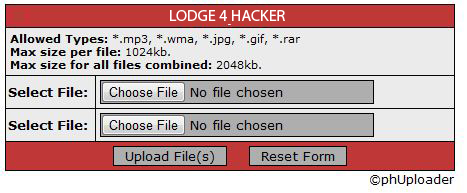
phUploader is a very simple script for uploading one or many files or images to your website. You can specify the file types accepted, file size and even control the file name. This script was build with PHP5 in mind and is not platform dependant. This script is very useful for temporary file storage or simple forum signature and avatar hosting.

We already discussed about Google Dork For "Remote File Inclusion" in previous post, Now let we see Remote File Inclusion/Upload Vulnerability on phUploader

Steps :
  • Go to Google and Enter this dork " intitle:Powered By phUploader "            
  • Select any website from search result, Exploit site looks like below link
                         http://{site.com}/ path/upload.php
                         http://site.com/upload.php
  • Now you will see a screen like above image,In that you can upload your file
  • You can see your file link after upload link.
  • Done!! "

Example:

Read more...

Thursday, 10 May 2012

Google Dork For "Remote File Inclusion"

Google dorks are the center of the Google Hacking. Many hackers use google to find vulnerable webpages and later use these vulnerabilities for hacking.

Remote File Inclusion (RFI) is a type of vulnerability most often found on websites. It allows an attacker to include a remote file, usually through a script on the web server. The vulnerability occurs due to the use of user-supplied input without proper validation.
List Of Google Dork For Remote File Inclusion:
  • inurl:rte/my_documents/my_files
  • inurl:/my_documents/my_files/
  • inurl:/shoutbox/expanded.php?conf=
  • inurl:/main.php?x=
  • inurl:/myPHPCalendar/admin.php?cal_dir=
  • inurl:/index.php/main.php?x=
  • inurl:/index.php?include=
  • inurl:/index.php?x=
  • inurl:/index.php?open=
  • inurl:/index.php?visualizar=
  • inurl:/template.php?pagina=
  • inurl:/index.php?pagina=
  • inurl:/index.php?inc=
  • inurl:"index.php?page=contact.php"
  • inurl:"template.php?goto="
  • inurl:"video.php?content="
  • inurl:"pages.php?page="
  • inurl:"index1.php?choix="
  • inurl:tinybrowser/upload.php
  • inurl:examples/uploadbutton.html
  • inurl:/modules/mod_mainmenu.php?mosConfig_absolute_path=
  • inurl:/include/new-visitor.inc.php?lvc_include_dir=
  • inurl:/_functions.php?prefix=
  • inurl:/cpcommerce/_functions.php?prefix=
  • inurl:/modules/coppermine/themes/default/theme.php?THEME_DIR=
  • inurl:/modules/agendax/addevent.inc.php?agendax_path=
  • inurl:/ashnews.php?pathtoashnews=
  • inurl:/eblog/blog.inc.php?xoopsConfig[xoops_url]=
  • inurl:/pm/lib.inc.php?pm_path=
  • inurl:/b2-tools/gm-2-b2.php?b2inc=
  • inurl:/modules/mod_mainmenu.php?mosConfig_absolute_path=
  • inurl:/modules/agendax/addevent.inc.php?agendax_path=
  • inurl:/includes/include_once.php?include_file=
  • inurl:/e107/e107_handlers/secure_img_render.php?p=
  • intitle:index of? inurl:kindeditor

How to Use Google Dork For Remote File Inclusion:
  1. Copy anyone of the Google dork from above list
  2. Paste it in Google Search textbox and click Search
  3. Now, the Vulnerable Websites are listed in search result
  4. Click anyone of the link,You will find upload option on it 
  5. Now, you can upload your files like Images,HTML files,Document,Shell,RAT,etc.. ,
This is a simple method to find Remote File Inclusion(RFI) Vulnerable Websites using Google Dork. For an hacker google is not only a search engine its also a tool for hacking. Thank you!!

Visit also:
Disable Google.com From Redirecting To Local Country Google Domain
                            (To Get more Vulnerable Websites)

Please leave your Comment/Suggestion below. . .

Read more...

Friday, 3 February 2012

SQL Injection Using Havij

SQL injection is a code injection technique that exploits a security vulnerability in a website's software. It is a technique used to take advantage of non-validated input vulnerabilities to pass SQL commands through a Web application for execution by a backend database. Attackers take advantage of the fact that programmers often chain together SQL commands with user-provided parameters, and can therefore embed SQL commands inside these parameters. The result is that the attacker can execute arbitrary SQL queries and/or commands on the backend database server through the Web application.

Havij is an automated SQL Injection tool that helps penetration testers to find and exploit SQL Injection vulnerabilities on a web page. It can take advantage of a vulnerable web application. By using this software user can perform back-end database fingerprint, retrieve DBMS users and  password hashes, dump tables and columns, fetching data from the database, running SQL  statements and even accessing the underlying file. The user friendly GUI (Graphical User Interface) of Havij and automated settings and detections makes it easy to use for everyone even amateur users.

Finding the SQL Vulnerable Websites :
  • We will use Google dorks to find the vulnerable websites, Most common dorks for sql injection vulnerable site are:-

    inurl:index.php?id=
    inurl:trainers.php?id=
    inurl:buy.php?category=
    inurl:article.php?ID=


  • Just search google using one of the dork and you will see a lot of vulnerable websites. Look like below,
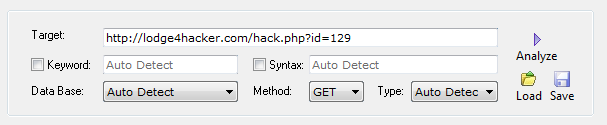
    Example : http://lodge4hacker.com/news.php?id=129

  • Now simply add an apostrophe( ' )to the end of url and press enter. If the website replies with an error then it shows that the website is vulnerable to SQL injection.
SQL Injection Using Havij Tool :
  • Start Havij and copy the url in target address.( The same url which we used to test for sql injection vulnerability but without ' ).


  • Click on the analyses button and wait for Havij to discover the database files for you.

  • At the bottom of the Havij terminal you will see the search progress in detail.


  • Once a database is found, you can click on tables tab to view the available tables. All the tables that are available in the database of the website are now shown.

  • Select that table and click on get columns. You will be listed with various columns that are present in the table.

  • Now select those columns whose data you want to retrieve. After selecting the various columns, click on get data to get the values stored in the columns. 

Now the website full database with you, Can do whatever you want !!

Finding Admin Page Using Havij Tool :
  • To find admin page in website, Click Find Admin tab

  • Now type the website link in Path to search and link start

  • Now, You will get admin page listed below

Decrypt MD5 Hash Using Havij :
  • To Decrypt MD5 hash , Click MD5 in Havij tool

  • Now paste your hash into MD5 hash input box and click start

  • Now you will get the decrypted hash in table from various online decryption website


DOWNLOAD :

Havij - Mirror1

Havij Full Version - Mirror2 ( Lodge4 Hacker )

Downlaod Havij Tool Help (PDFs format)

Read more...

Tuesday, 24 January 2012

Best Browser-Based P2P File Sharing Sites

"Technology Rules the World". Everyone knows technology has taken over the world and has forever changed the way we communicate, connect, share information and transferring files. In those days we want to transfer a file to another we use an email to transfer it but supports only limited amount of size(Up-to 10 MB). and then an online file hosting websites are arrived that too have some limitation limited storage space, maximum file size allowed for transfer or expiry time to collect the file. At last, Now P2P File Sharing Sites are introduced  to overcome this limitation!!
What is Peer to Peer ?
Peer-to-peer file sharing or commonly known as P2P is a convenient way of sharing files over the internet. However, you must be very careful when using P2P because some of the files uploaded to the internet have viruses, spyware and other threats that can harm your PC, So transfer your file only with your friends.
List of Best Browser-Based P2P File Sharing Sites
Files Over Miles
FilesOverMiles is a direct file sharing tool for quickly and securely sending files over the internet. There is no installation or sign up and transferred files are not stored anywhere.

PipeBytes
PipeBytes is favorite web-based P2P file sharing service. There’s no upload limit and your friend could start downloading the file as you upload it.

JetBytes
JetBytes is an experimental direct file transfer tool that lets you quickly send files over the net. The application creates direct link between sender and receiver and does not store files during the transfer

Dushare
Dushare is a simple direct file-transfer service. It makes sending unlimited file sizes between two people as simple as a clicking a link

xFiles

xFiles is a P2P based file transfer service that completely eliminates all of these risks. Just head over to xFiles and choose the file you want to transfer. Once you have selected the file, you will instantly be provided with a URL that you can send to the desired recipient. Once they go to the URL and click claim, the file will start downloading to their computer.

Conclusion
Above  Browser-Based P2P File Sharing Sites are the best Site from my analysis. I always preferred to use Files Over Miles its working good. If you like this post leave a small comment and likes here. . .
Thank you ,
Best Wishes!!

Read more...

Monday, 16 January 2012

Anonymous Hackers Wallpaper


Created
 by 
View In Full Size
(1920X1080)

Read more...

Create File With Fixed Size and Type in Windows

Command Prompt is a non-graphical interface that allows you to interact with your operating system. Once you learn how to use command prompt and their commands, you can unleash supreme power and rule your computer! But really, you can do almost anything with cmd.
Steps:
  1. Go to Start->All Programs->Accessories->Right Click on Command Prompt and Click "Run as Administrator
  2. Go to Directory on which you want to create that file in Command Prompt
  3. -------------- Command To Change Directory  -------------------
     Cd <Name of Directory>           (To Enter into Directory)
    Cd..                                    (To Exit From Current Directory)
    ----------------------------------------------------------------------

  4. Now enter the command to create file with fixed size and type
  5. fsutil file createnew <file name> <size in bytes> 
    Example:
     fsutil file createnew test.mp3 20000000000
    File is create in your specified directory !!
-------------------------------Descriprion of Fsutil Command--------------------------------
Fsutil is a command-line utility that you can use to perform many FAT and NTFS file system related tasks, such as managing reparse points, managing sparse files, dismounting a volume, or extending a volume. Because fsutil is quite powerful, it should only be used by advanced users who have a thorough knowledge of Windows XP. In addition, you must be logged on as an administrator or a member of the Administrators group in order to use fsutil.
---- Fsutil SubCommands----
8dot3name       8dot3name managment
behavior        Control file system behavior
dirty           Manage volume dirty bit
file            File specific commands
fsinfo          File system information
hardlink        Hardlink management
objectid        Object ID management
quota           Quota management
repair          Self healing management
reparsepoint    Reparse point management
resource        Transactional Resource Manager management
sparse          Sparse file control
transaction     Transaction management
usn             USN management
volume          Volume management
--------------------------
------------------------------------------------------------------------------------------------------

Conclusion:
This tutorial not only shows how to Create File With Fixed Size and Type in Windows and also explains the use of most powerful command "fsutil". If you like  this post please give me a like on above facebook like box

Note:  FSUTIL utility requires administrative privileges.
See Also :
Matrix Code Effect In Command Prompt
Run Commands or DOS Commands For Hackers

Read more...

Thursday, 12 January 2012

Use Your Profile Picture As Emoticon In Facebook Chat

Today we are going to see another feature in facebook that recently facebook introduced one of the coolest things ever in their Facebook Chat. For years we are using emoticons to express our feelings but now with this new Facebook People Emoticon Feature we can use any person’s, official page’s or event page’s display picture in Facebook chat.
Steps to Use Your Profile Picture As Emoticon In Facebook Chat :
Step-1 :
Just you need to have a Username for your profile, if you don’t have one then you can set your Facebook profile username here.
Or

You can check the link of your profile and will find a number like this 100003262824948 You can use this instead of your username.
Step-2:
Now, Open the Chat box/Messages and in the text bar write, [[Username]] or [[Profile ID]] and hit Enter.
Example:  [[100003262824948]]   or   [[siva01sankar]]
Now enjoy with new Facebook People Emoticon / Smiley Feature !!
Conclusion:
Facebook is dynamic growing company releasing new feature day by day , Now this feature "Profile Picture As Emoticon In Facebook Chat" has some limitation that these custom emoticons can be sent using Mobile devices however they cannot be viewed as graphics in the mobile, They will be displayed as the brackets with codes in the mobile view but on the desktop view they would appear normally. Keep visiting our blog and please leave your small comment below help me to increase my blogging skills.


Read more...

Friday, 6 January 2012

Update Facebook Status Via “YOUR NAME”


We are always looking for ways to impress our friends, maybe though the latest applications or a status,Facebook is a community where we can connect and share with others. We can watch that most of them updating their comments from different application and devices like iPhone, Android, Twitter, etc . . .,
Here we going to see how to update via your name !!


How exactly is this done though?
We need to create our own personalized application, writing an coding for an application is a difficult and long time process . But here we are going to use small trick to update our status via any name as you like. Let's see how to do this !!
Steps to Update Facebook Status Via “YOUR NAME” :-
  • Goto Facebook Developers
  • Now Goto Create New App ( In Upper RightSide of the Page)
  • Now Enter App Display Name and Agree Facebook Platform Policies.
  • Then Security Check (CAPTCHA), You will be taken to the Dashboard after Security Check
  • Now you can see your application numbers ( App ID/API Key ) Note your App ID
  • Now Goto "https://www.facebook.com/connect/prompt_feed.php?preview=true&api_key=XXXXXXXXXXX" after replacing XXXXXXXXXXX with your App ID
Example :
  • Now you will see an Facebook status bar , where you can update anything you want via your own App name

Please leave your comment Below !!


Read more...

Sunday, 1 January 2012

Facebook launches Messenger for Windows Now Officially Available For Download

Facebook is a social utility that connects people with friends and others who work, study and live around them. Facebook launched in February 2004 in a short period it reaches to a position #2 (Alexa Traffic Rank) with its dynamic and user friendly Services. Now Facebook launches messenger for windows allows users to connect with their friends without relying on a browser to sign in.


Facebook said in its Help Center that :
Messenger is a new, trial application that lets you use Facebook without being on www.facebook.com. While you surf the web or use other applications on your computer, you can: 
  • Chat and message with your friends on Facebook
  • See the latest updates from your friends in ticker
  • Get quick notifications about what’s going on
We’re testing out a first version of the app with a small group of people. During this trial period, we plan on rolling out changes to the app and expect outages and periods of instability as we make improvements
Conclusion:
Overall Facebook Messenger provides an awesome features. It allow users access to the real time aspects of the website without the need to have the browser open and have the distraction of all of the features.


Read more...

Thursday, 22 December 2011

Online Email Spoofing Using Emkei's Fake Mailer


Email spoofing is email activity in which the sender address and other parts of the email header are altered to appear as though the email originated from a different source.


Emkei's Fake Mailer is a website to send fake emails from anybody to anybody . Emkei is a fake mail server that captures emails as files for acceptance testing. This avoids the excessive configuration of setting up a real mail server and trying to extract mail queue content. There are many free services that allow you to send fake emails, but some of them do not allow sending Links (URL’s) along with the fake email . If you need such service for sending fake emails with hyperlinks , then I would recommend Emkei’s Fake Mailer. This is a useful website which allows you to send fake emails.

Note : Kindly do not misuse it for any other purposes.Your IP address gets saved on there server, So do not misuse this free service.


Read more...

Home